Affiliate Disclosure: This page contains affiliate links to products selected for practical fit. When you purchase through these links, we may earn a commission at no additional cost to you. Recommendations are based on the registry's stated features, price, level, pros, cons, and best-for labels. We do not imply hands-on testing without an explicit page-level record. See our complete Tools Guide for comparison notes and selection criteria.
Why Brushes Matter More Than You Think
Procreate ships with solid default brushes, but serious calligraphers invest in specialty packs—not for more options, but for pressure curves tuned to mimic real nib behavior.
Start with the included brushes and identify what you want to change before buying a pack. This guide does not document firsthand brush tests. Pressure-responsive brushes require a compatible pressure-sensitive Pencil; Apple Pencil USB-C has no pressure input.
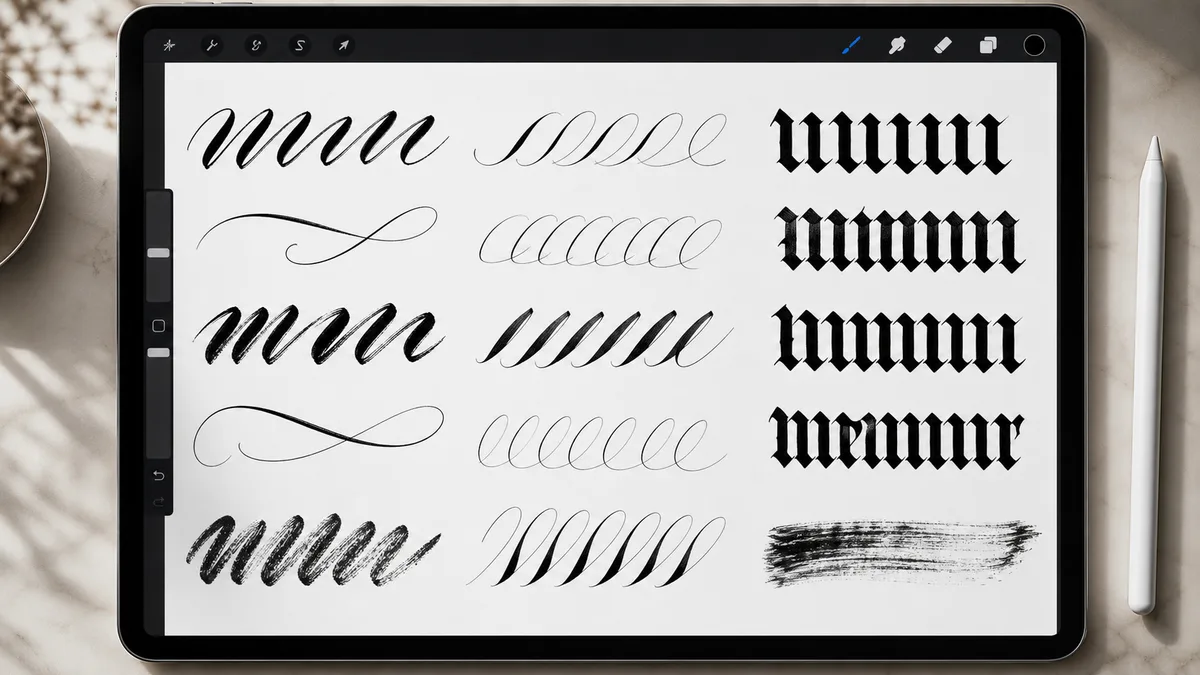
This guide breaks down the best Procreate brushes for modern calligraphy, Copperplate, Blackletter, monoline, and texture work. The shortlist compares stated pressure response, stroke stability, installation clarity, and license information rather than claiming firsthand daily use.
Evaluation focuses on pressure response, stroke stability, install clarity, license transparency, and whether a pack helps a specific script—not on the size of the bundle.
Modern Calligraphy Brushes (Flexible Pointed Pen Simulation)
Modern calligraphy—think wedding invitations, Instagram quotes, bouncy hand lettering—requires brushes that mimic flexible pointed pens like the Nikko G or Brause EF66. Look for steep pressure curves, subtle texture, and exit-stroke taper.
Modern Calligraphy Brush Listings
The Modern Calligraphy Procreate Brush Pack listings link opens a marketplace search, not a verified pack from a named educator. Compare the seller's brush samples, included files, app requirements, and license. Useful features to look for include:
- Pressure response: Look for samples showing hairline and shaded strokes. No measured equivalence to a Nikko G or other physical nib is established here; Procreate brush marks are raster artwork, not vector paths.
- Texture: Check whether grain remains visible at your intended output size and suits the project.
- Script examples: Inspect complete words, not only isolated strokes. Baseline variation and letter construction come from how you draw, not a brush name.
Check whether the seller includes installation and technique instructions. For a simple tracing background, use our Practice Sheet Generator: export a horizontal font-tracing sheet, import its PNG on a separate visible layer, and hide that layer before exporting finished art. Reference is a ColorDrop feature, not an export exclusion.
Compare Samples Before Buying
If a seller offers a sample, try it with your own Pencil and canvas size. Compare light strokes, shaded strokes, and joins. This guide has no side-by-side measurements supporting a ranking of creators' pressure curves or brush quality.
Brushes for Copperplate and Spencerian Practice
Follow the slant, proportions, and stroke construction in a chosen exemplar. Copperplate and Spencerian are not interchangeable, and a brush marketed for either does not certify the accuracy of a lesson or the marks you draw.
Copperplate Brush Listings
The Copperplate Procreate Brush Pack listings link opens a marketplace search. It does not verify a particular creator, teaching credential, included brush, or Hunt 101 nib simulation. Check the selected listing rather than relying on the category label.
If a pack includes a guideline brush, compare its slant and proportions with your chosen lesson. Pair practice with our Copperplate guide for an introduction, then use an attributable exemplar for letterforms. Digital pressure response is not a substitute for learning how a physical nib behaves.
Free Starter Brush Resources
The Free Procreate Starter Brushes resource points to a Procreate community discussion area, not an IAMPETH-issued Spencerian brush. Check each creator's availability, licensing, and installation instructions. Built-in brushes also let you start without downloading a third-party pack.
Blackletter & Gothic Brushes (Broad-Edge Simulation)
Blackletter scripts (Textura, Fraktur, Rotunda) use broad-edge or flat nibs held at a fixed angle—typically 30–45°. Digital brushes simulate this by rotating the brush shape and locking the angle regardless of pen direction.
Blackletter Brush Listings
The Blackletter Procreate Brush Pack listings link is a marketplace search, not a verified June Digan pack. Before buying, check examples of the following:
- Broad-edge response: Check how the brush shape changes with stroke direction. A pack name does not establish a fixed angle or complete Textura construction.
- Script coverage: Distinguish Textura and Fraktur examples rather than treating them as the same model. See our Blackletter style guide.
- Decorative capitals: Check whether examples or instructions are supplied; brush files alone do not teach initials.
No included PDF, historical exemplar, or specific creator has been verified for this search destination. Use an attributable lesson alongside any brush you select.
Monoline Brushes (Uniform Stroke Weight)
Monoline lettering uses uniform line weight—no pressure variation, no thick-thin contrast. Think sans-serif hand lettering, geometric brush scripts, or faux calligraphy skeletons.
Procreate Default Monoline (Free)
Procreate's included Monoline brush makes uniform-width strokes. Its output is raster artwork, not vector paths. If needed, adjust StreamLine in Brush Studio's Stabilization section and compare with the unchanged brush. Pair practice with a spacing grid, and you're set.
Third-Party Monoline Options
The Monoline Procreate Brush Pack listings link opens a marketplace search. Compare actual brush samples with the included Monoline brush before paying for another option. No named creator, eight-brush bundle, or automatic grid-snapping feature is verified here.
Texture & Shading Brushes (Depth and Vintage Effects)
Texture brushes add ink bleed, paper grain, dry-brush effects, or shadow layers. Use sparingly—too much texture fights legibility.
Texture and Shading Listings
The Texture and Shading Procreate Brush Pack listings link opens a marketplace search, not a verified True Grit bundle. Inspect full-size samples for edge texture, grain, and halftone effects, then check the chosen seller's license and included files.
Try texture on a separate layer so you can adjust or remove it without changing the lettering. Direct textured strokes are another option; compare both at the intended output size.
Dry Ink (Procreate Default)
Try Procreate's included Dry Ink brush before buying a texture pack. Compare the edge and grain with the effect you want. Pair with advanced shading techniques for dimensional lettering.
Free vs. Paid: When to Invest
Free brushes work for learning fundamentals and casual practice. Invest in premium packs when:
- You've identified a preferred style (modern vs. Copperplate vs. Blackletter) and want specialist tools.
- You're doing client work and need predictable, professional results.
- You've hit the limits of defaults—your upstrokes aren't staying thin, your flourishes feel stiff, or you're fighting the pressure curve instead of flowing with it.
Don't buy brushes to "unlock" skill. A $20 Copperplate pack won't fix bad letterform fundamentals. Drill basics with free tools, then upgrade when you can articulate exactly what's missing ("I need steeper pressure curves" or "I want built-in texture variation").
Installation & Organization Tips
Download .brush or .brushset files to your iPad's Files app. Tap to open in Procreate—brushes auto-import and appear in the Brush Library under the set name. Organize immediately:
- Create a "Daily" set: Swipe left on your 3–5 most-used brushes → Duplicate → drag into a new set called "Daily Drivers." Pin this set to the top of your library.
- Archive specialty brushes: Blackletter, texture, and experimental brushes go into sets you can collapse when not in use.
- Delete duplicates: Many brush packs include variations you'll never touch. Ruthlessly prune—less scrolling = more flow.
Use the Brush Library's sharing controls to export a brush or set. Save the file separately and check that it can be reimported before relying on it as your backup.
Example Starter Brush Choices
If you're ready to invest but overwhelmed by options, start with this three-pack combo:
- Modern Calligraphy Procreate Brush Pack listings — compare pressure-response samples and the actual seller.
- Copperplate Procreate Brush Pack listings — compare brush behavior, without treating it as a verified script model.
- Procreate Default Monoline (free) + Dry Ink (free) — covers monoline and texture needs without extra cost.
These are suggested categories, not tested coverage of a percentage of lettering tasks. Verify each pack's creator, contents, current price, and compatibility before buying. A brush does not certify a historical stroke model.
Pair your brushes with the right hardware—our iPad buying guide covers model compatibility and pressure support, including the Apple Pencil Pro and USB-C version (which has no pressure sensitivity). Then read Procreate setup to configure pressure curves and canvas presets that match your new brushes.
Beyond Brushes: Tools That Amplify Your Workflow
Brushes are one piece. Complement them with:
- Practice Sheet Generator — export horizontal tracing sheets and import them on separate visible layers. Hide the guides before exporting finished art.
- Cursive Generator — preview how different fonts render the same phrase; use as layout reference.
- Font Pairing Assistant — pair hand-lettered elements with digital typefaces for composite designs.
- 30-Day Calligraphy Challenge — structured practice prompts to build brush fluency.
- Paperlike screen protector — adds tooth to iPad glass; makes Apple Pencil feel like pen on paper.
For comprehensive skill-building, read our beginner's guide alongside recommended books like Sheila Waters' Foundations of Calligraphy or an attributable Spencerian copybook. Slant, proportions, and stroke order depend on the chosen script and model, not the device or brush pack.
Top Procreate Brush Packs
Best brush packs for digital calligraphy on iPad
Modern Calligraphy Procreate Brush Pack
Curated brush packs designed for modern, bouncy calligraphy in Procreate. These brushes mimic the flex of a pointed pen …
Copperplate Procreate Brush Pack
Brush sets that emulate pointed-pen behavior for digital Copperplate and Engrosser's Script practice. Ideal for studying…
Monoline Procreate Brush Pack
Even-weight brushes that produce a uniform line at any pressure, perfect for monoline lettering, signatures, and modern …
Free Procreate Starter Brushes
A starter set of free brushes — including Procreate's built-in Calligraphy and Inking libraries plus free sampler brushe…
We may earn a commission when you buy through these links. See all recommendations →